Learning how to automatically enroll contacts in HubSpot sequences is the difference between outreach that runs itself and outreach that depends on a rep remembering to click. When enrollment is manual, it is the first task that gets skipped on a busy day. This guide shows how to make it automatic from any workflow trigger, with the guardrails that keep it safe.
The workflow action that makes this possible on Sales Hub Professional comes from SeqBridge, an approved HubSpot Marketplace app built by CraftWave Innovations. It is not affiliated with or endorsed by HubSpot, Inc.
The problem with manual sequence enrollment
A quick definition. In HubSpot, sequences are 1:1 personalised sales outreach in Sales Hub that send from a user's connected personal inbox and stop automatically when a contact replies. They are excellent at the outreach itself. They are not good at starting themselves.
Natively on Professional, a rep enrolls each contact by hand. That works at low volume, but it has three predictable failure modes: leads that never get enrolled because nobody got to them, slow enrollment that lets the first-touch window close, and inconsistent targeting because each rep decides on the fly. None of these are discipline problems you can train away at scale. They are what manual steps always do.
Automation removes the step. The moment a contact meets a condition you trust, they enter the right sequence, every time.
Triggers that should auto-enroll (form fills, list membership, deal stage)
The art of automatic enrollment is choosing triggers that reliably signal "this person should hear from us now." A few work well across almost every team.
- Form fills. A demo request, content download, or contact form is a clear intent signal. Enroll these contacts into a sequence matched to what they asked for.
- List membership. When a contact joins an active list, for example "MQLs this quarter," enroll them automatically so the list does the segmentation and the workflow does the outreach.
- Deal stage. When a deal moves to a stage like "Discovery booked" or "Proposal sent," enroll the contact in a follow-up sequence tuned to that stage.
Pick triggers that map cleanly to a single, appropriate sequence. A vague trigger enrolls the wrong people into the wrong outreach, which is worse than no automation at all.
How to automatically enroll contacts in HubSpot sequences
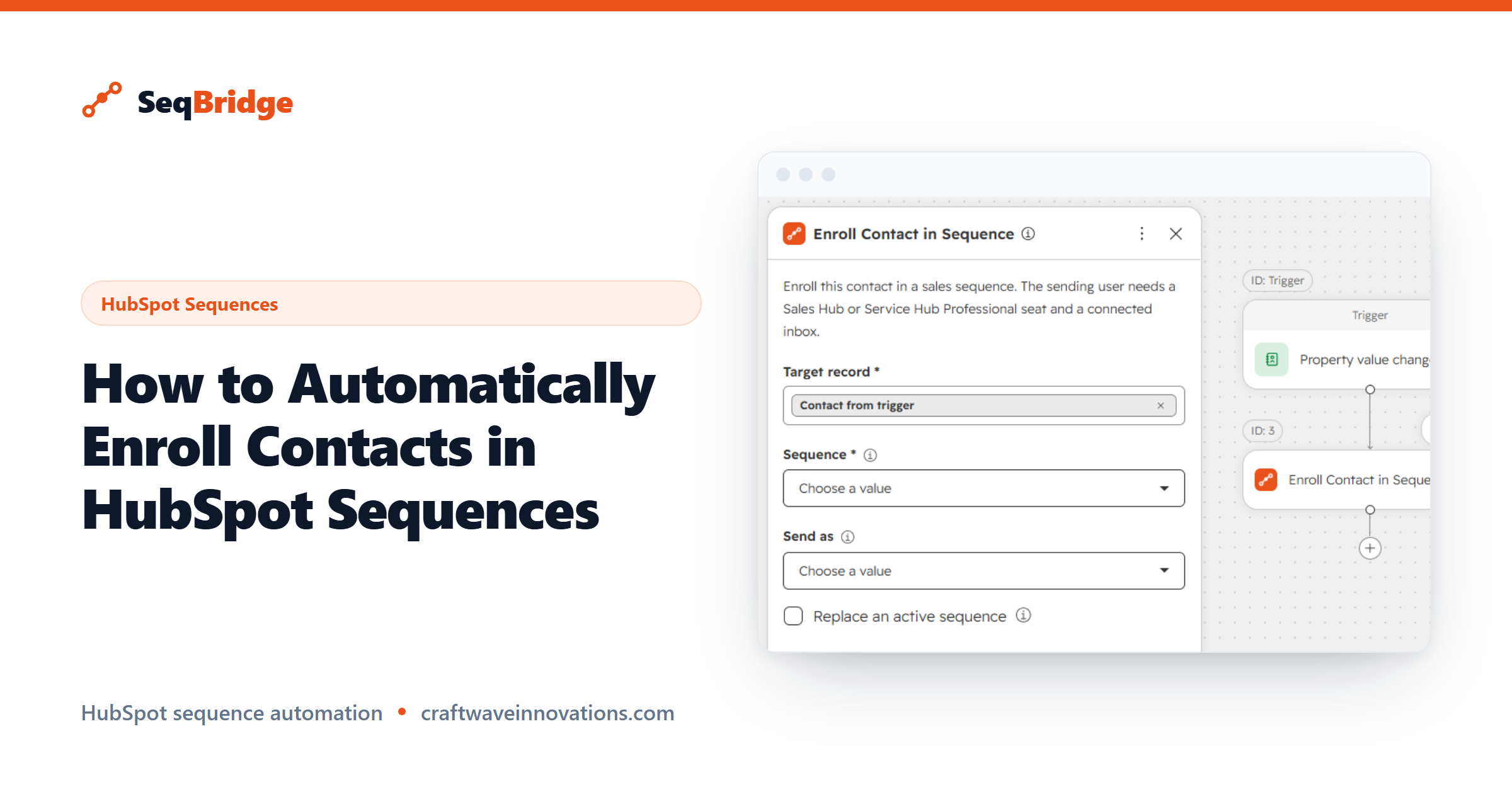
Once you know the trigger, the build is short. SeqBridge adds an Enroll in sequence action to HubSpot workflows on Professional, and you drop it in like any other step.
- Install SeqBridge and connect your portal via OAuth.
- Create a contact-based workflow and set your chosen trigger, such as a form submission.
- Add the SeqBridge Enroll in sequence action.
- Select the sequence and the sending user whose inbox the emails will send from.
- Turn the workflow on.
That is the whole mechanism. For the detailed, field-by-field version, see our documentation, and for a plain overview of what SeqBridge does, start on the home page. If you can build a HubSpot workflow, you can build this.
Guardrails: quotas, unenrollment and reply handling
Automated outreach needs guardrails, because the whole point is that it runs without a human checking each send. Three matter most.
Quotas and limits. HubSpot enforces daily send and active-enrollment limits (check your portal), and those limits belong to the sending user whose inbox is doing the work. Automation does not override them, so spread high volume across appropriate sending users rather than pointing everything at one inbox. HubSpot's sequences documentation explains how these limits behave.
Reply handling. Sequences stop automatically when a contact replies, so a prospect who answers will not keep getting scripted follow-ups. This is built into how HubSpot sequences work and is one of the reasons they are safe to automate.
Unenrollment. Sometimes you want to pull a contact out before the sequence ends, for example once they book a meeting. SeqBridge adds an Unenroll from sequence action for exactly this, which HubSpot has no native automated equivalent for.
Measuring enrolled vs replied
Automation is only worth it if you can see what it produced. Start with two numbers: how many contacts were enrolled, and how many replied.
SeqBridge shows enrollment status on each contact record, so you can confirm the workflow is firing and catch any failures, which appear with plain-English reasons. For reply and engagement data, use HubSpot's own sequence analytics, which track opens, replies, and meetings against each sequence.
Watching enrolled versus replied over time tells you whether your triggers are choosing the right people and whether your sequences are landing. If enrollment is high but replies are low, the problem is usually the sequence content or the trigger match, not the automation itself.